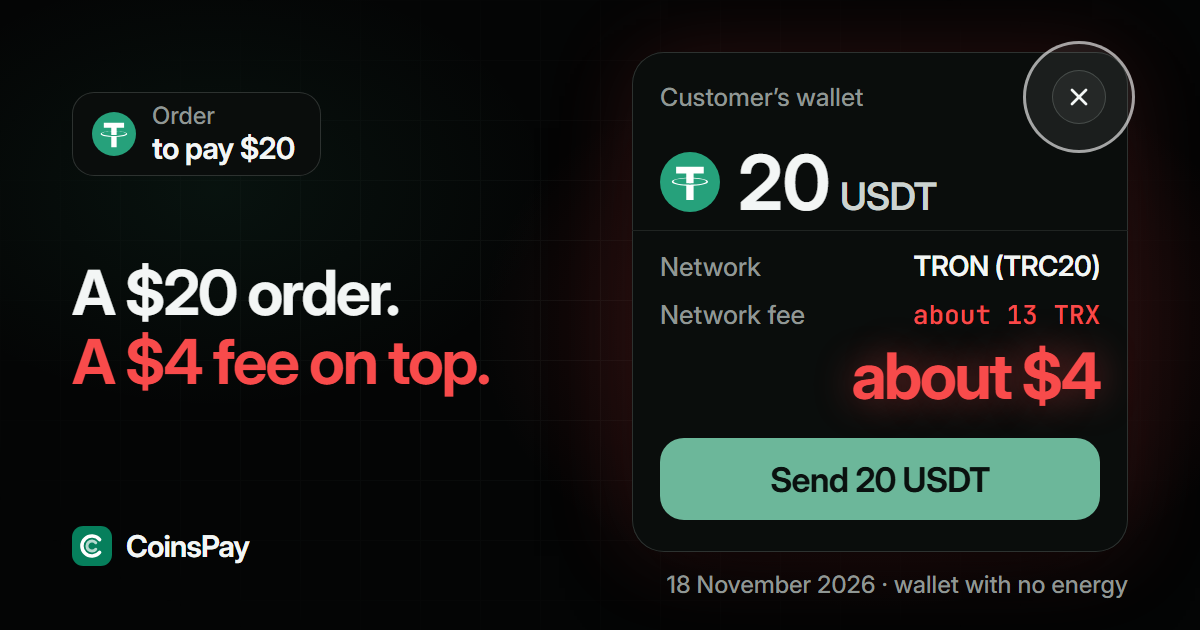
A $20 order. Your customer reaches checkout, sees "USDT, TRON network" on your payment page and opens their wallet. The wallet shows the transfer fee: about 13 TRX. At the 18 November 2026 rate that is about four dollars. A fifth of the order, just to be allowed to pay.
One network over, the same transfer costs under a cent that day. But that network isn't on your page: when you set up payments you enabled one, TRON. "It's the cheapest, after all."
The customer closes the tab. Nobody tells you. You just get one more unpaid order in the list.
The short version: accept USDT on the four networks that hold nearly all of it, and don't pick the network for your customer. The usual advice, "enable TRC20, it's the cheap one", can cost you orders today.
The table that flipped
Here is what the same USDT transfer from a personal wallet cost on 18 November 2026.
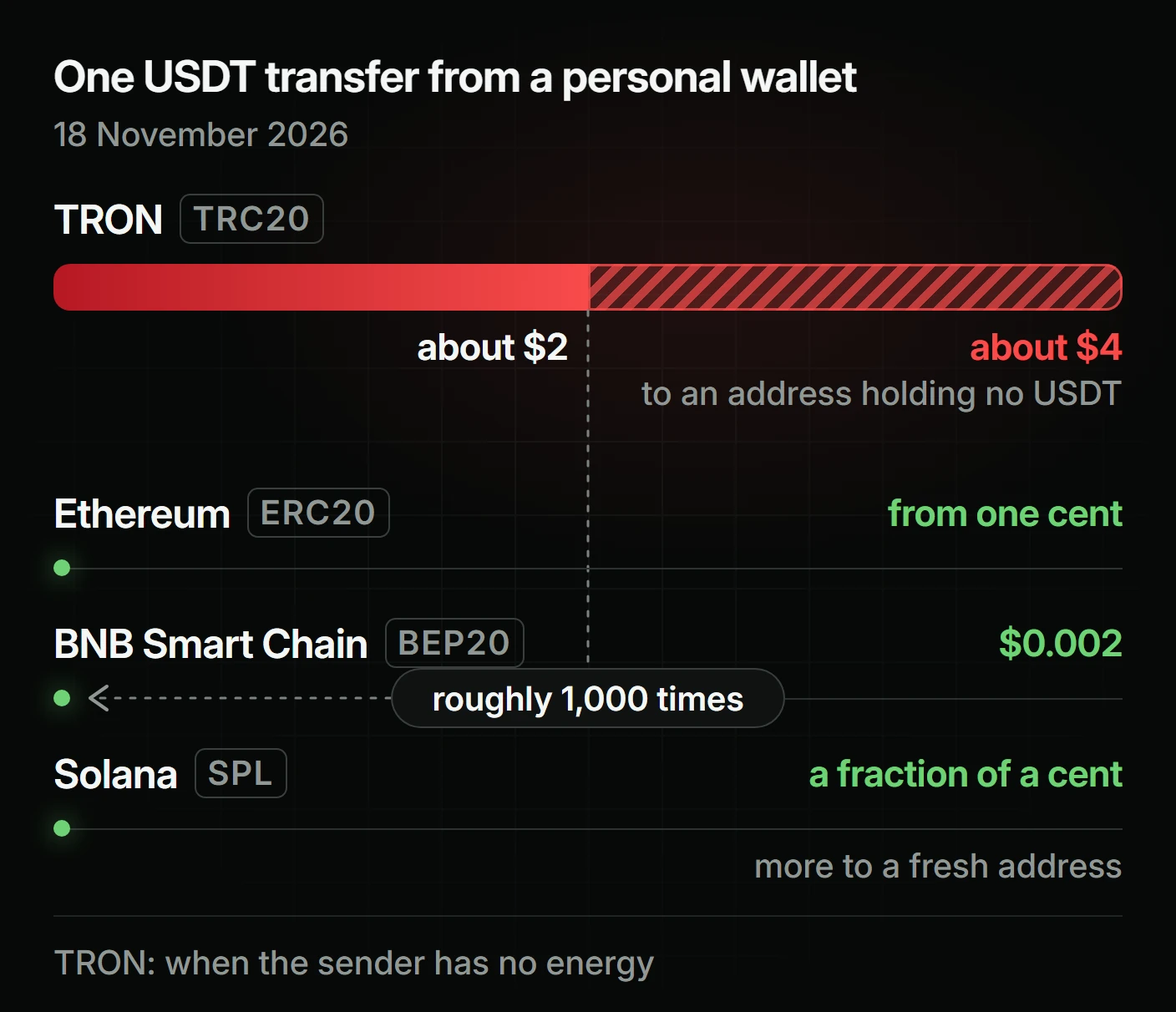
Between TRON and BNB Smart Chain the gap is roughly a thousandfold. The TRON numbers come from measurements by the node provider Dwellir: 6.43 and 13.03 TRX when the sender has no energy (more on that below). An address issued for an order is empty, so it gets the second price. The BNB Smart Chain figure is that day's token transfer estimate on the BscScan gas tracker. Solana's base fee is 0.000005 SOL, but to a fresh address the sender also pays to create the USDT account.
Ethereum has a reputation for being expensive, and here it costs cents. How many is partly the wallet's call: a real transfer on 14 November came to about 19 cents, and nearly all of that was the tip the sender set. At the gas price alone on the morning of 18 November we get about one cent.
Six years ago it was the other way round, at least at the exchanges. In October 2020 a Bitcointalk forum member wrote that Binance charged nothing to withdraw USDT over TRC20 and 3 USDT over ERC20. The "enable TRC20" habit probably dates from then.
Fees change daily, so don't memorise these numbers. Remember that the table has already flipped once.
Not everyone pays the four dollars
On TRON a token transfer is paid for in energy, and energy has no free quota: either the sender stocked up in advance, or the network burns their TRX. In that same Dwellir sample, five USDT transfers out of six burned no TRX for energy: that is how exchanges, services and TRON regulars pay. The four dollars land on someone with an ordinary wallet who has never heard of energy.
And a customer paying from an exchange never sees the network fee at all. They see the exchange's price list. Take the same customer with twenty dollars, except their USDT is on Bitget. Per the exchange's public data on 18 November, withdrawing over TRC20 costs them 1.5 USDT and over BEP20 0.01. Kraken's table that day showed 1 USDT on TRON and about 0.5 on Ethereum, with no BNB Smart Chain option for USDT at all.
Two exchanges, two different pictures, and TRC20 is the cheapest on neither. You don't know which exchange your next customer uses, so you can't guess the right network for them.
Where your customer's money sits
The other half of the question is which network your customer holds USDT on. According to DefiLlama on 18 November, of roughly $175 billion in USDT, 52% is on TRON, 38% on Ethereum, 5% on BNB Smart Chain and 1% on Solana. A store that takes only TRON can't reach almost half of that money.
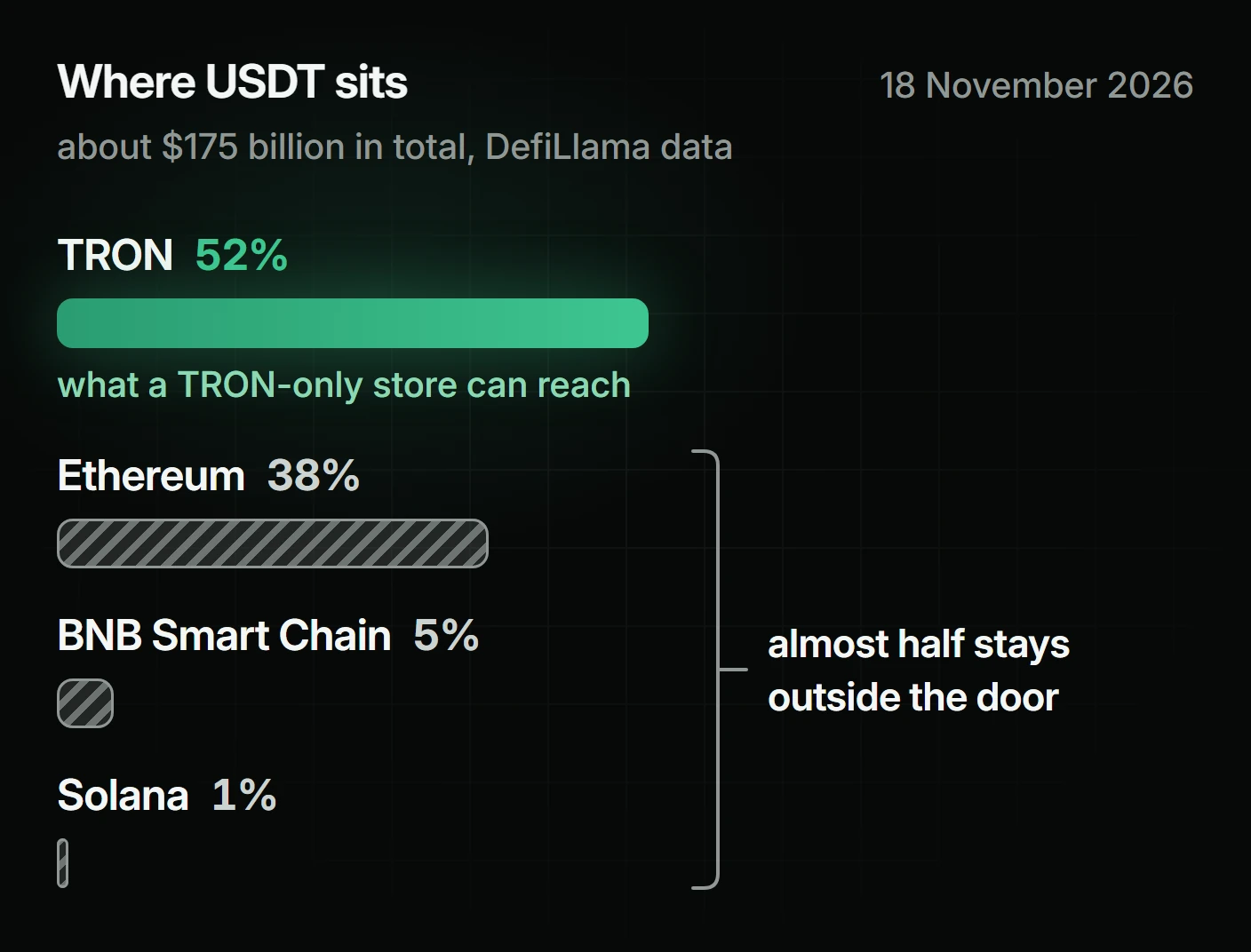
Where USDT sits and what people pay with are different things, though. In a report by Glassnode and the payment service NOWPayments dated 10 November, USDT on TRON and BNB Smart Chain brings that service's merchants three quarters of their stablecoin payment value, and 86% with Ethereum added. That is one service's data, not the whole market. Still, look at BNB Smart Chain: it holds a twentieth of all USDT, and in this report it is one of the three networks behind that 86%.
A customer whose USDT all sits in a TRON wallet with no energy gains nothing from extra networks. The ones who gain are the customer paying from an exchange, who picks the network at withdrawal, and the customer whose USDT is on another network. Today you have left the first a single button and the second none.
There is no cheapest network for USDT. There is the one your customer's money is already on, and choosing it is their call, not the store's.
Four networks, four ways to get it wrong?
A fair objection: the more networks on the page, the easier they are to mix up. And the mistake is expensive. At the payment service Cryptopay, recovering a payment sent on the wrong network costs 20 euros, and a payment smaller than that is not returned at all.
But look at the mistake from the customer's side. Ethereum and BNB Smart Chain addresses look alike, both start with 0x, and a wallet will take such an address on either network. Cryptopay's own help page uses exactly this example: USDT sent over BEP-20 to an address issued for ERC-20. To the customer USDT is just USDT. They find out there are two networks after the money has left.
So what matters is what the customer sees next to the address at the second they copy it. And someone who has just picked the network themselves at least knows there is more than one.
What to change in your payment settings
- Look at your typical order. At twenty or thirty dollars an order, a two- or four-dollar fee decides whether the customer pays.
- Turn on the four largest USDT networks: TRON, BNB Smart Chain, Ethereum and Solana. If four isn't possible yet, keep at least the first three.
- Take "we only accept TRC20, it's cheaper" off your site. Customers can see for themselves where a transfer is cheaper today, in their wallet or at their exchange.
- Look at your payment page as a customer would: the network and the token standard should sit right next to the address, in large type. A wrong-network transfer is hard or impossible to fix.
- Set up a payout address on every network. If the wallet is your own and you hold its keys, one
0x…address works for both Ethereum and BNB Smart Chain. Don't assume that for an exchange deposit address: first check that the exchange takes USDT on each of the two. TRON and Solana each need their own.
How CoinsPay handles it
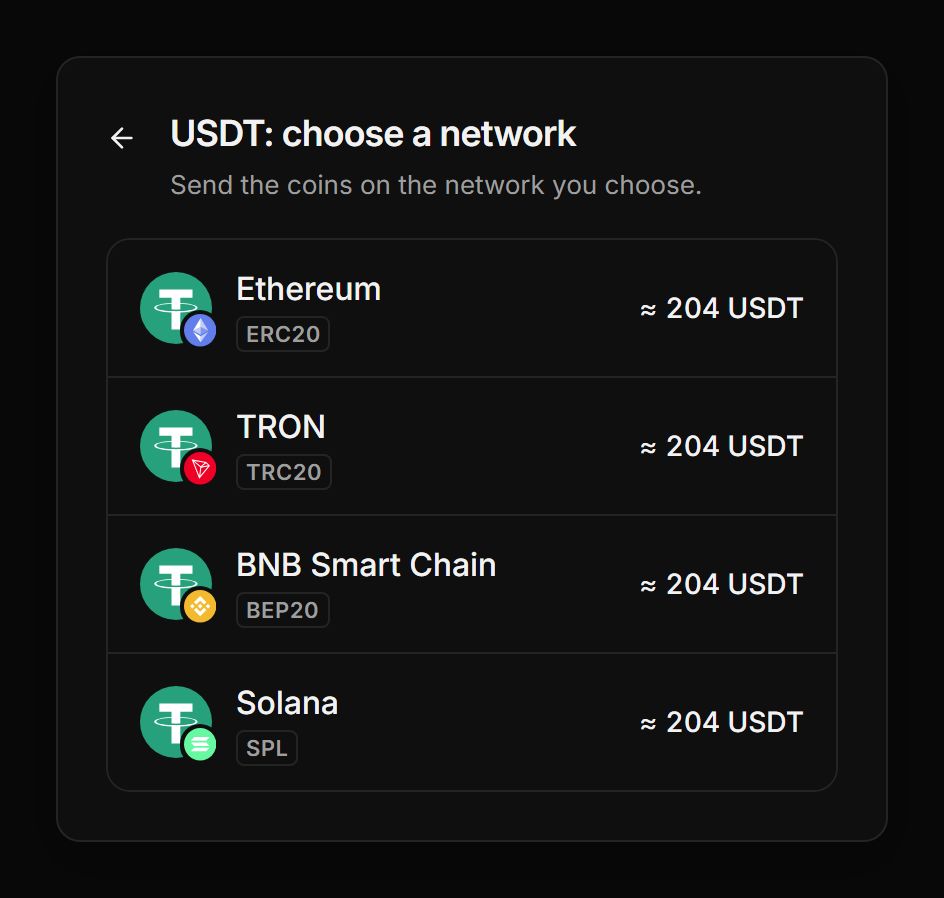
We built our payment page so that the customer picks the network. It takes USDT on four networks: TRON, BNB Smart Chain, Ethereum and Solana. The customer chooses a coin, then a network, and the one where a wallet transfer currently costs less carries a "Cheapest" tag. The page doesn't know exchange price lists: a customer paying from an exchange checks their own. After that, the network and the token standard sit right at the address, along with a warning: "Send only USDT on the TRON network. Coins sent on another network may be lost."
For the Ethereum and BNB Smart Chain mix-up we have an answer. The two networks share one address, so if a customer confuses them, the payment isn't lost with us: we see it on the network it arrived on, credit it there and pay it out under that network's payout rule. With no rule for that network, the money stays on the address. A network we don't run is another matter: we don't support TON, Base, Arbitrum or Polygon, and we can't return a transfer sent there. That is why the warning sits at the address.
Payouts go to your wallets under your payout rules, which are set per network, so you need an address on each of the four. A rule covers every coin on its network, so an exchange address only works if the exchange accepts each coin you have enabled there. Each network has its own minimum payout, and a payment below it isn't paid out automatically. If your orders are small, check the minimum in your dashboard before you turn a network on. And if there is a network you don't want, an invoice can be limited to the coins and networks you tick.
Open your payment page the way a customer with twenty dollars sees it and count the USDT networks on offer. If the answer is one, start there. And if you'd like the page itself to show where a transfer is cheaper right now, create an account, add a shop and enter a payout address on each of the four networks.