Accept crypto on your  DLE site
The CoinsPay module adds a crypto payment system to DLE-Billing. Users top up their balance and pay for services of your site in USDT, BTC, ETH or any of 30+ coins, the amount lands on their balance on its own, and the money goes straight to your wallets.
- DataLife Engine
- 19.0+ with DLE-Billing 1.0.3+
- PHP
- 8.0 to 8.5
- Module
- free, MIT
What the module gives you
The balance tops up on its own
As soon as the network confirms the payment, the amount appears on the balance of the user and the receipt closes. A paid user group, paid content and other services of DLE-Billing plugins are delivered as when paid with the balance.
Money lands in your wallets
CoinsPay does not hold your revenue: every payment goes on to your wallets by the payout rule of your shop. Each network takes up to 5 addresses with shares, say 70% to you and 30% to a partner.
The balance stays in your currency
Keep the balance in roubles or whatever suits you. DLE-Billing converts the amount to the invoice currency by your rate, and CoinsPay converts it to the coin at the current rate and holds the amount for 30 minutes while the user opens a wallet.
A key that cannot withdraw
The module only needs a key with "Invoices only" access: it can create invoices and follow them, but it cannot move money.
Set up in five minutes
You need a CoinsPay account with a shop, access to the files of your site and the admin panel of DLE with DLE-Billing installed. No developer required.
- 01Upload the moduleDownload the archive and copy the contents of its upload folder into the root of your site over FTP or the file manager of your hosting. The module creates its tables itself.
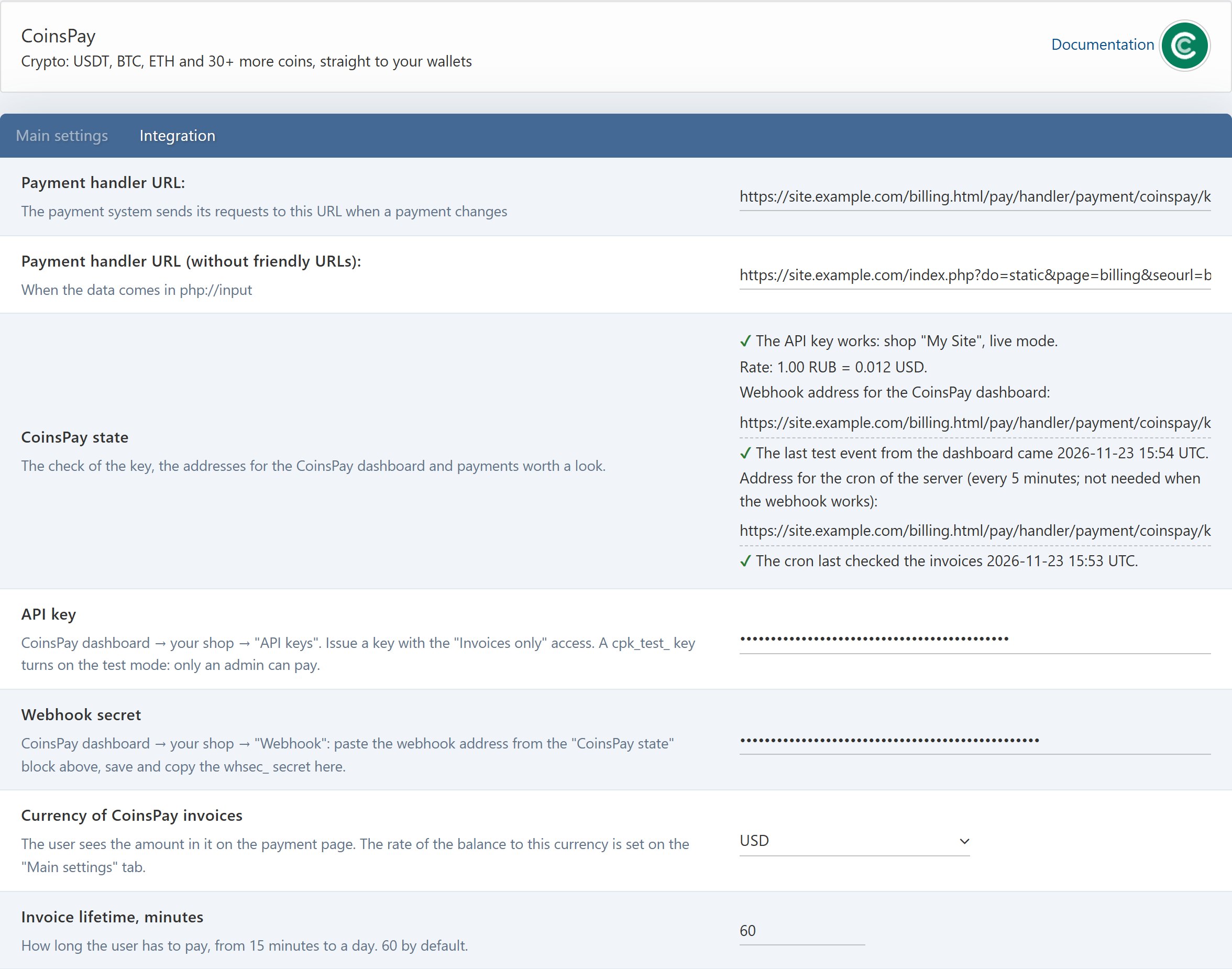
- 02Switch CoinsPay on in DLE-BillingDLE-Billing → Payment systems → CoinsPay: switch it on and set the rate of the balance to the invoice currency. On the Integration tab paste a key with "Invoices only" access from the CoinsPay dashboard.
- 03Connect the webhookCopy the webhook address from the "CoinsPay state" block into the "Webhook" section of the dashboard, and paste the whsec_ signing secret into "Webhook secret".
- 04Check it with a test paymentPut in a cpk_test_ key and top up the balance as an admin. No money moves, and the amount lands on your own balance.
It handles the awkward cases too
Lost webhooks, an underpayment, a receipt deleted halfway: the module credits only what came, and exactly once.
Each payment once
The webhook, the cron check and the user pressing "Pay" again can arrive at the same moment, and the amount is still credited once: the module checks the balance history of DLE-Billing.
No payment gets lost
Webhooks are signed, and the module checks the signature and reads every invoice back from CoinsPay. Without webhooks it finds the payment when the user presses "Pay" again, when you open the settings, and by a cron address.
Underpayment
If less came, the user can pay the rest on the same page. If the invoice expires first, the part received goes to the balance, and a new invoice asks only for the rest.
Overpayment
The receipt closes, the excess stays on the balance of the user, and you get a note in the "CoinsPay state" block.
Late payment
Money that comes after the invoice expired, or for a receipt DLE-Billing has deleted, still lands on the balance of the user.
Services of DLE-Billing plugins
A paid user group, paid content and other plugins work as when paid with the balance: the amount comes to the balance and goes straight to the service. DLE-Billing coupons count.
The user can pay the fees
Turn these settings on, and the CoinsPay fee and the network fee are added to the amount on the payment page.
Everything in the settings
The "CoinsPay state" block shows the shop of the key, the addresses for the dashboard, payments worth a look and the last lines of the log.
Test mode
With a cpk_test_ key an invoice is paid with a button on the payment page, and no coins move. Only an admin can pay this way, so users get nothing for free while you try it out.
Installation
The module is one archive on GitHub next to its source code. Its upload folder goes into the root of your site, as any payment system of DLE-Billing.
API documentation- DataLife Engine
- 19.0 or newer
- DLE-Billing
- 1.0.3 or newer, the free balance module for DLE
- PHP
- 8.0 to 8.5, with cURL
- License
- MIT, as DLE-Billing
Pay only when you get paid
- First 10 days fee-free, on payouts up to $500
- No monthly or setup fee
- The fee can go on the buyer’s invoice
- Network fees at cost, no markup
Questions about the module
All questionsHow much does the module cost?
The module is free. You only pay the CoinsPay fee on payouts: as low as 0.3%, going down as your turnover grows, with no monthly fee. For the first 10 days after your first payment, payouts up to $500 carry no fee.
Which coins can users pay with?
More than 30 coins and tokens on TRON, Ethereum, BNB Smart Chain, Solana, Bitcoin and Litecoin: USDT, USDC, BTC, ETH, BNB, TRX, LTC, SOL and more. A setting can limit the choice to stablecoins.
Does the module work without DLE-Billing?
No. DataLife Engine has no payments of its own: the balance, receipts and payment systems come with the free DLE-Billing module. CoinsPay is one of its payment systems.
Our balance is in roubles. Can we take payments in dollars?
Yes. The balance stays in roubles: pick the invoice currency in the CoinsPay settings, USD for example, and set the rate on the "Main settings" tab, and DLE-Billing converts the amount itself. Invoices can be in roubles too.
How do I check it before taking real payments?
Put in a cpk_test_ key and top up the balance as an admin: the invoice is paid with a button on the payment page, and the amount lands on your balance. The guide of the module walks you through it.
Which languages does the module speak?
English and Russian. Messages to the user and the settings of the module follow the language of your site, and the payment page opens in it.
What user data goes to CoinsPay?
The description of the payment as DLE-Billing writes it, which includes the login of the user, the receipt number, the amount and currency, and the address to send the user back to. Emails and IP addresses are not sent.
Start taking crypto today
Signing up takes a minute and setting up a shop about five more. Connecting is free.
DataLife Engine is a registered trademark of SoftNews Media Group. DLE-Billing is an independent open-source project. CoinsPay is not affiliated with SoftNews Media Group or the authors of DLE-Billing, and the module is not sponsored or endorsed by them.