Accept crypto in  WooCommerce
The CoinsPay plugin adds a "Cryptocurrency" payment method to your checkout. Buyers pay in USDT, BTC, ETH or any of 30+ coins, the order is marked paid on its own, and the money goes straight to your wallets.
- WooCommerce
- 3.0 to 11.2
- WordPress and PHP
- 4.7+, PHP 7.0–8.5
- Plugin
- free, GPL
What the plugin gives you
Orders mark themselves paid
Once the network confirms the payment, the order moves to Processing, or straight to Completed for virtual goods. The buyer is sent back to the order page in your store.
Money lands in your wallets
CoinsPay does not hold your revenue: every payment goes on to your wallets by the payout rule of your shop. Each network takes up to 5 addresses with shares, say 70% to you and 30% to a partner.
Prices stay in your store currency
Products keep their prices in dollars, euros or any currency you use. CoinsPay converts the total at the current rate and holds the coin amount for 30 minutes while the buyer opens a wallet.
A key that cannot withdraw
The plugin only needs a key with "Invoices only" access: it can create invoices and follow them, but it cannot move money. Even if the key leaks from your site, your revenue stays in your wallets.
Set up in five minutes
You need a CoinsPay account with a shop and access to your WordPress admin. No developer required.
- 01Install the pluginDownload the archive and upload it in WordPress under Plugins → Add New Plugin → Upload Plugin. Then activate it.
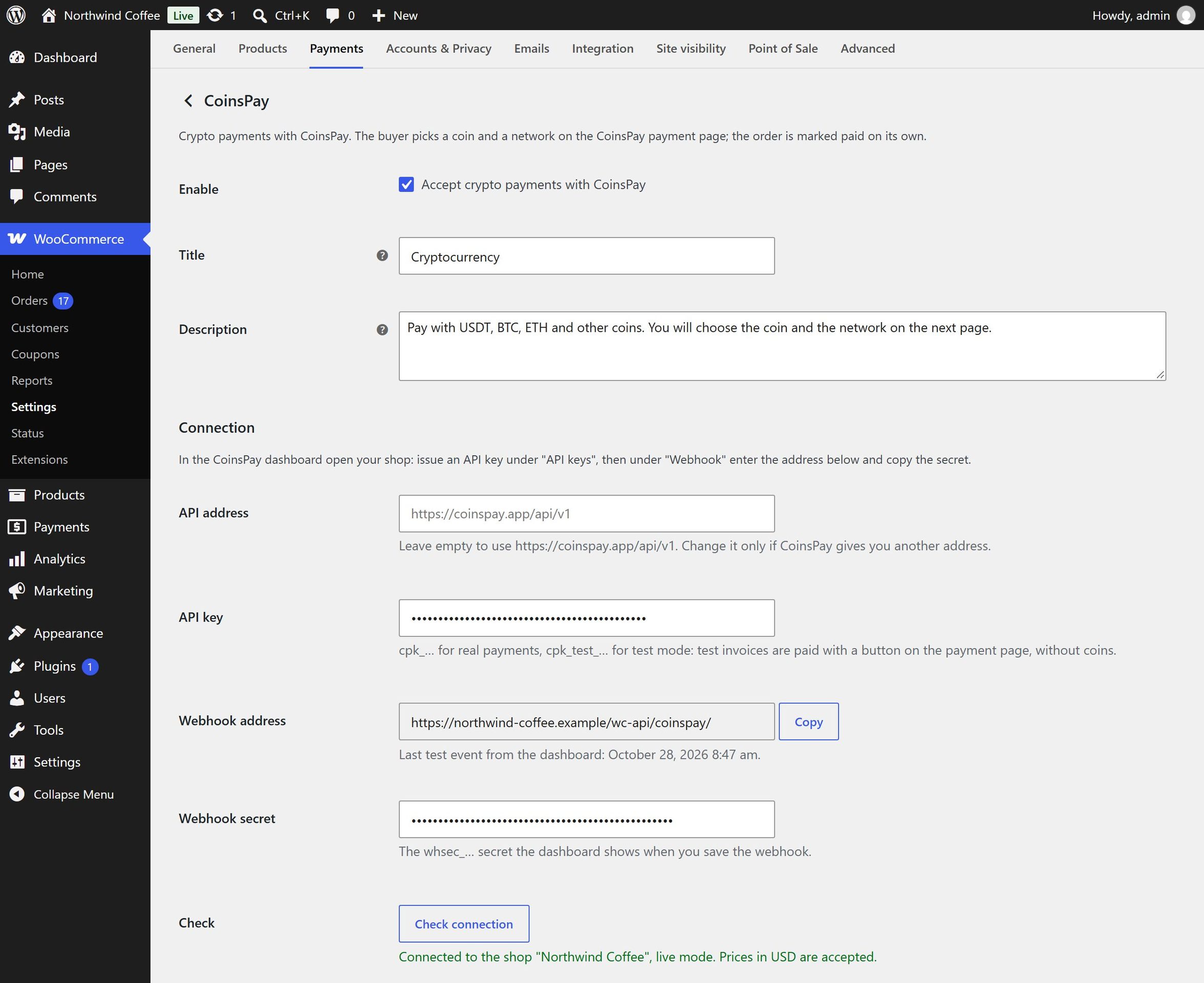
- 02Paste the keyIn the CoinsPay dashboard open your shop and create a key under "API" with "Invoices only" access. Paste it into the plugin settings: WooCommerce → Settings → Payments → CoinsPay.
- 03Connect the webhookCopy the webhook address from the plugin settings to the "Webhook" section of the dashboard, and the whsec_ signing secret back into the plugin.
- 04Check and enable"Check connection" shows the name of your CoinsPay shop. Send a test event from the dashboard, enable the payment method and save.
It handles the awkward cases too
Underpayments, expired invoices, cancelled orders: the plugin knows what to do with the order and leaves a note on it.
Payment on its way
While the network confirms a payment, the order is On hold, so nothing ships before the money arrives.
Underpayment
If less arrives, the order goes on hold with a note of what was received and what is left. The buyer can pay the rest on the same page.
Expired invoice
An unpaid order is cancelled and its stock returned; you can turn this off. If the buyer pays later anyway, the order is reopened and marked paid.
Cancelled in the store
Cancel an order and its CoinsPay invoice is cancelled too, so it can no longer be paid. A payment for a cancelled order or for the wrong amount puts the order on hold for you to decide.
No payment gets lost
Webhooks are signed, and the plugin checks the signature. If a webhook does not arrive, the plugin asks CoinsPay about open invoices on its own every few minutes.
The buyer can pay the fee
Turn these settings on and the CoinsPay fee and the network fee are added to the coin amount on the payment page. The order total in your store stays the same.
Any checkout
The classic checkout page and the Cart and Checkout blocks. High-Performance Order Storage is supported.
Test mode
With a cpk_test_ key, invoices are paid with a button on the payment page and no coins move. Such a payment completes only orders placed by a shop manager.
English and Russian
Settings, order notes and checkout labels come in English and Russian.
Installation
The plugin archive and the source code are on GitHub. It installs like any other plugin: upload the archive in your WordPress admin.
API documentation- WordPress
- 4.7 or newer
- WooCommerce
- 3.0 or newer, tested up to 11.2
- PHP
- 7.0 to 8.5
- License
- GPLv2 or later
Pay only when you get paid
- First 10 days fee-free, on payouts up to $500
- No monthly or setup fee
- The fee can go on the buyer’s invoice
- Network fees at cost, no markup
Questions about the plugin
All questionsHow much does the plugin cost?
The plugin is free. You only pay the CoinsPay fee on payouts: as low as 0.3%, going down as your turnover grows, with no monthly fee. For the first 10 days after your first payment, payouts up to $500 carry no fee.
Which coins can buyers pay with?
More than 30 coins and tokens on TRON, Ethereum, BNB Smart Chain, Solana, Bitcoin and Litecoin: USDT, USDC, BTC, ETH, BNB, TRX, LTC, SOL and more. A plugin setting can limit the choice to stablecoins.
What currency can my prices be in?
USD, EUR, GBP, AED, CNY, JPY, RUB, TRY and the other currencies CoinsPay accepts. The plugin loads the list, and if your store currency is not on it, the payment method is hidden at checkout.
What if the buyer pays less?
The order goes on hold with a note of what was received and what is left. The buyer can pay the rest on the same payment page.
What buyer data goes to CoinsPay?
The order number, the total and currency, the names and quantities of the items and the address of the order page in your store. Buyer names, emails, addresses and phone numbers are not sent.
Can I connect a staging copy of my site?
Yes, but give it a separate CoinsPay shop. A shop has one webhook address, so its events would reach only one of the two sites.
Start taking crypto today
Signing up takes a minute and setting up a shop about five more. Connecting is free.