Accept crypto in  JoomShopping
The CoinsPay module adds a "Cryptocurrency" payment method to the JoomShopping checkout. Buyers pay in USDT, BTC, ETH or any of 30+ coins, a paid order gets the Paid status on its own, and the money goes straight to your wallets.
- JoomShopping
- 4.18 and 5
- Joomla
- 3.10 to 6
- Module
- free, GPL 3.0
What the module gives you
The order is completed the JoomShopping way
In JoomShopping an order paid online stays unfinished until the payment. The module completes it as the buyer leaves for the payment page, the way JoomShopping itself does: the coupon is used, the order e-mail goes out, the stock is taken. Then every invoice event gets the status you chose and a line in the order history.
Money lands in your wallets
CoinsPay does not hold your revenue: every payment goes on to your wallets by the payout rule of your shop. Each network takes up to 5 addresses with shares, say 70% to you and 30% to a partner.
Prices stay in your currency
The invoice is made in the currency of the order, the one the buyer saw at checkout. CoinsPay converts the total at the current rate and holds the coin amount for 30 minutes while the buyer opens a wallet.
A key that cannot withdraw
The module only needs a key with "Invoices only" access: it can create invoices and follow them, but it cannot move money. The webhook secret stays in a password field.
Set up in five minutes
You need a CoinsPay account with a shop and the Joomla administrator. No developer and no FTP required.
- 01Install the packageIn the Joomla administrator open System → Install → Extensions and upload coinspay-joomshopping.zip. The package adds the "Cryptocurrency" payment method, still unpublished, and on Joomla 4.1 and newer a scheduler task that checks unpaid invoices.
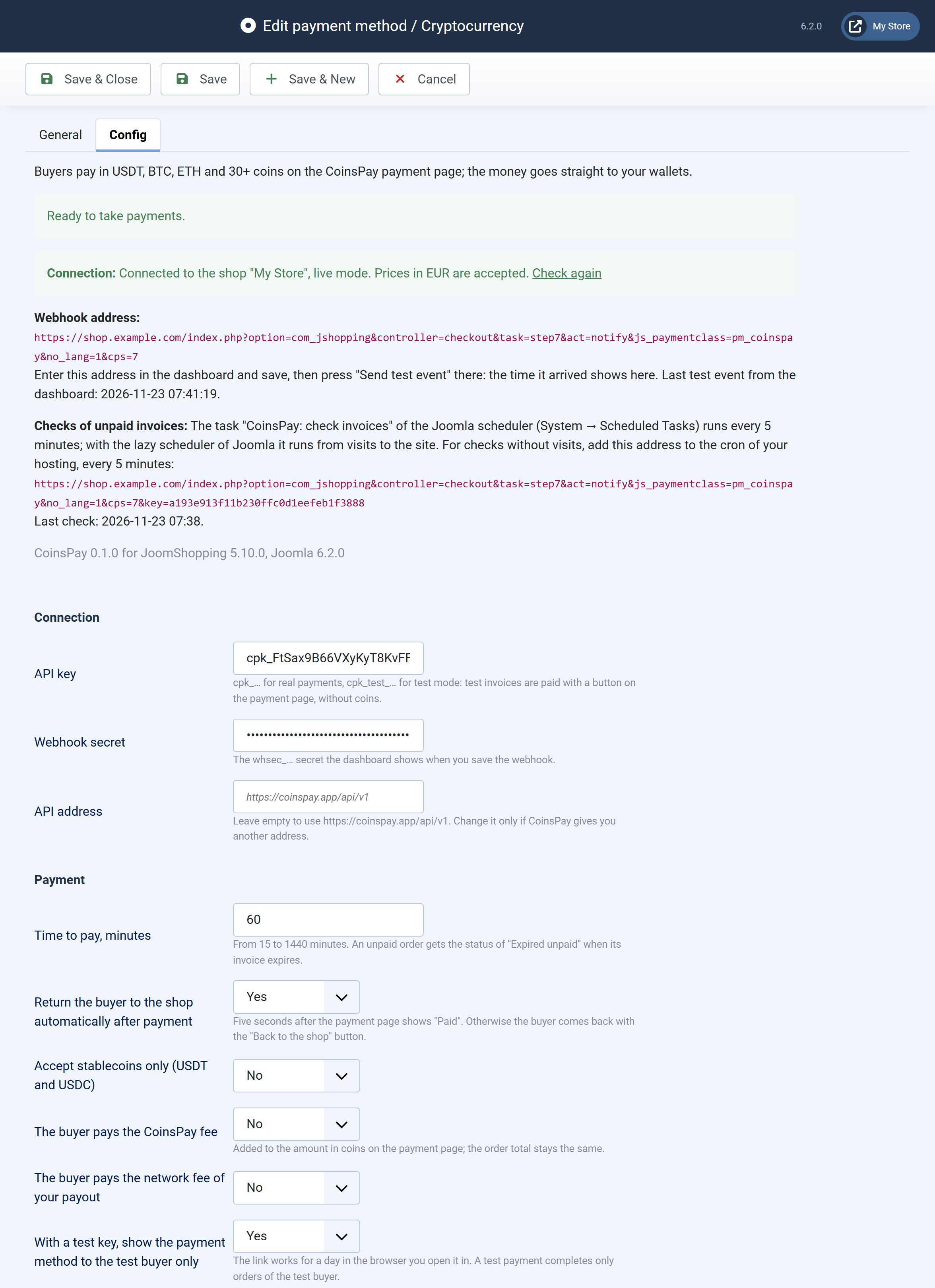
- 02Paste the keyOpen Components → JoomShopping → Options → Payments → Cryptocurrency, and on the Config tab paste a key with "Invoices only" access from the CoinsPay dashboard into "API key".
- 03Connect the webhookCopy the webhook address from the panel at the top of the settings to the "Webhook" section of the dashboard, and the whsec_ signing secret back into the module.
- 04Check, pay once, publishSave: the panel checks the connection and shows the name of your CoinsPay shop. Pay one order with a cpk_test_ key, then put the live key in and publish the method.
It handles the awkward cases too
Underpayments, expired invoices, cancelled orders: the module sets the status you chose and leaves a note in the order history about what happened.
Payment on its way
While the network confirms a payment, the order history gets the amount and the transaction hash. The order keeps its "Awaiting crypto payment" status until the money is in.
Underpayment
If less arrives, the history says what was received and what is left, and the buyer can pay the rest on the same page. If the invoice expires part-paid, the order gets the "Crypto payment review" status for you to decide.
Expired invoice
You set the time to pay, from 15 minutes to a day. An unpaid order moves to Cancelled. A payment that arrives later still counts.
Cancelled in the shop
Cancel an order in JoomShopping, and the module cancels its CoinsPay invoice at the next check, so it can no longer be paid. A payment for a cancelled order or for the wrong amount gets the "Crypto payment review" status.
Back from the payment page
When the buyer comes back, the module checks the invoice at once and JoomShopping shows its usual "thank you" page. If the invoice is still open, the buyer goes back to the payment page.
No payment gets lost
Webhooks are signed, and the module checks the signature. If a webhook does not arrive, the task "CoinsPay: check invoices" of the Joomla scheduler asks CoinsPay about open invoices every 5 minutes; on Joomla 3 a cron address does it.
Statuses of your own
The module adds two order statuses, "Awaiting crypto payment" and "Crypto payment review", and finds them again after a reinstall. Paid goes to the Paid status of JoomShopping; you can change any of them.
The buyer can pay the fee
Turn these settings on and the CoinsPay fee and the network fee are added to the coin amount on the payment page. The order total in your shop stays the same.
Test mode
With a cpk_test_ key, invoices are paid with a button on the payment page and no coins move. JoomShopping cannot hide a method, so other buyers who pick it get a message to choose another one.
Installation
One package fits JoomShopping 4.18 on Joomla 3.10 and JoomShopping 5 on Joomla 4 to 6. It is in the releases of the coinspay-joomla repository on GitHub, next to the archives for VirtueMart and HikaShop: take coinspay-joomshopping. The Joomla installer puts it in; no JoomShopping file is changed.
API documentation- JoomShopping
- 4.18 and 5, tested on 4.18.9 and 5.10.0
- Joomla
- 3.10 to 6, tested on 3.10, 4.4 and 6.2
- PHP
- 7.0 to 8.5, whatever your Joomla runs on
- Languages
- English and Russian
Pay only when you get paid
- First 10 days fee-free, on payouts up to $500
- No monthly or setup fee
- The fee can go on the buyer’s invoice
- Network fees at cost, no markup
Questions about the module
All questionsHow much does the module cost?
The module is free. You only pay the CoinsPay fee on payouts: as low as 0.3%, going down as your turnover grows, with no monthly fee. For the first 10 days after your first payment, payouts up to $500 carry no fee.
Which coins can buyers pay with?
More than 30 coins and tokens on TRON, Ethereum, BNB Smart Chain, Solana, Bitcoin and Litecoin: USDT, USDC, BTC, ETH, BNB, TRX, LTC, SOL and more. A setting can limit the choice to stablecoins.
When does the buyer get the order e-mail?
JoomShopping sends it when the order is completed. The module completes the order right before the buyer goes to the payment page, so the e-mail comes then. The e-mails for later statuses follow your JoomShopping settings.
Why is the order completed before the payment?
So the goods are not sold twice while the network confirms the payment, and the payment always has an order to land on. The order waits with the "Awaiting crypto payment" status; if the invoice expires unpaid, it moves to Cancelled.
Which statuses does it use?
Awaiting crypto payment while the invoice is open, Paid when the money is in, Cancelled when the invoice expires unpaid, and Crypto payment review when something needs your eye. Each event has its own field in the settings.
My site runs Joomla 3. Will invoices still be checked?
Yes. Joomla 3 has no task scheduler, so the panel of the settings shows a cron address: add it to the cron of your hosting every 5 minutes. Without it, invoices are still checked when the webhook comes and when the buyer returns.
What buyer data goes to CoinsPay?
The order number, the total and currency, the names and quantities of the items and the address to send the buyer back to after payment. Buyer names, emails, addresses and phone numbers are not sent.
Can I connect a staging copy of my site?
Yes, but give it a separate CoinsPay shop. A shop has one webhook address, so its events would reach only one of the two sites.
Start taking crypto today
Signing up takes a minute and setting up a shop about five more. Connecting is free.
JoomShopping is a product of MAXXmarketing GmbH. Joomla! is a trademark of Open Source Matters, Inc. CoinsPay is not affiliated with or endorsed by MAXXmarketing GmbH, The Joomla! Project or Open Source Matters, and they do not support this module.