Accept crypto in  Magento
The CoinsPay module adds a "Cryptocurrency" payment method to the Magento checkout. Buyers pay in USDT, BTC, ETH or any of 30+ coins, a paid order gets its Magento invoice on its own, and the money goes straight to your wallets.
- Magento
- 2.4.4 to 2.4.9
- PHP
- 8.1 to 8.5
- Module
- free, OSL 3.0
What the module gives you
Paid orders are invoiced on their own
Once the payment is confirmed, the module creates a paid Magento invoice with the CoinsPay invoice as its transaction, and the order moves to Processing. Every event adds a comment with the amount, coin and transaction hash to the order history; the buyer does not see it.
Money lands in your wallets
CoinsPay does not hold your revenue: every payment goes on to your wallets by the payout rule of your shop. Each network takes up to 5 addresses with shares, say 70% to you and 30% to a partner.
Prices stay in your store currency
The invoice is made in the currency of the order, or in the base currency if CoinsPay does not take it. CoinsPay converts the total at the current rate and holds the coin amount for 30 minutes while the buyer opens a wallet.
A key that cannot withdraw
The module only needs a key with "Invoices only" access: it can create invoices and follow them, but it cannot move money. The key and the webhook secret are stored encrypted and never shown in the settings form.
Set up in four steps
You need a CoinsPay account with a shop and access to the Magento admin. Installing the module takes two commands on the server, as with any Magento module.
- 01Install the moduleRun composer require coinspay/coinspay-magento and bin/magento setup:upgrade. Without Composer, unpack the archive from GitHub into app/code/CoinsPay/Payment and run the same command.
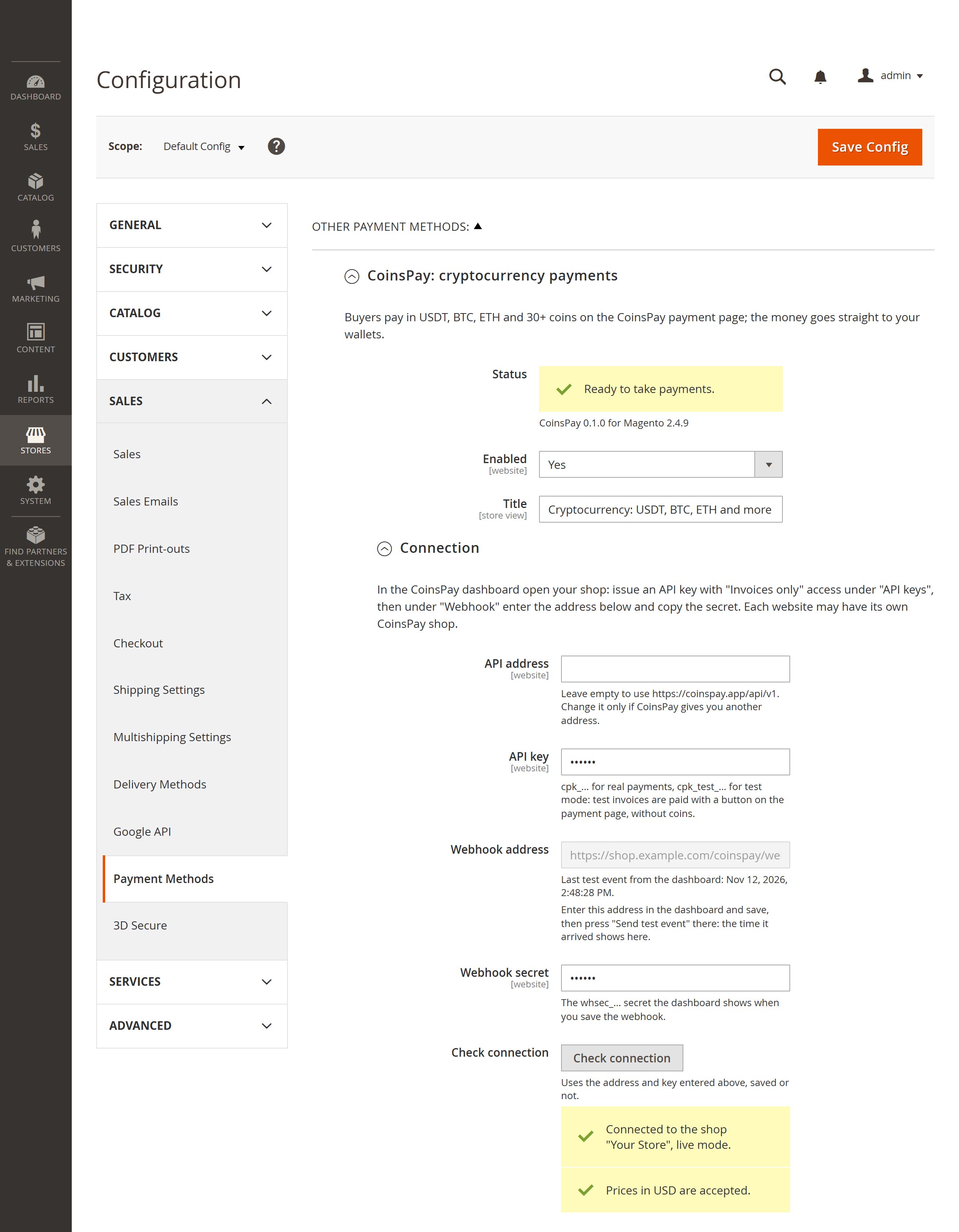
- 02Paste the keyOpen Stores → Configuration → Sales → Payment Methods → CoinsPay. In the CoinsPay dashboard create a key under "API keys" with "Invoices only" access and paste it into "API key".
- 03Connect the webhookCopy the webhook address from the module settings to the "Webhook" section of the dashboard, and the whsec_ signing secret back into the module.
- 04Check and save"Check connection" shows the name of your CoinsPay shop. Look over the statuses under "Order statuses" and save: the payment method is already at checkout.
It handles the awkward cases too
Underpayments, expired invoices, cancelled orders: the module moves the order to the right state, sets the status you chose and leaves a comment about what happened.
Payment on its way
While the network confirms a payment, the order history gets a comment with the amount and the transaction hash. The order waits in Pending Payment until the payment is confirmed.
Underpayment
If less arrives, the order gets a comment with what was received and what is left, and the buyer can pay the rest on the same page. If the invoice expires part-paid, the order is put on hold for you to decide.
Expired invoice
You set the time to pay, from 15 minutes to a day. An unpaid order is cancelled, and Magento returns the stock. The settings warn if Magento would cancel pending orders sooner than that.
Cancelled in the store
Cancel an order, or let Magento cancel an old pending one, and its CoinsPay invoice is cancelled too, so it can no longer be paid. A payment for a cancelled order or for the wrong amount puts the order on hold with the "Crypto payment review" status.
Paying later
A buyer who closed the payment page finds a "Go to payment" button on the order page in their account while the invoice is open. One who came back without paying can put the items back in the cart.
No payment gets lost
Webhooks are signed, and the module checks the signature. If a webhook does not arrive, the Magento cron asks CoinsPay about open invoices every 5 minutes, and "Refresh" on the order page does it at once.
The buyer can pay the fee
Turn these settings on and the CoinsPay fee and the network fee are added to the coin amount on the payment page. The order total in your store stays the same.
Several websites
The key and the webhook secret are set per website, so each website can have its own CoinsPay shop or share one. The name of the payment method is set per store view, in its language.
Test mode
With a cpk_test_ key, invoices are paid with a button on the payment page and no coins move. Only the test buyer sees the payment method, so real customers never notice it.
Installation
One package fits Magento Open Source and Adobe Commerce from 2.4.4 to 2.4.9. Install it with Composer, or unpack the archive from GitHub into app/code; the source code is there too.
API documentation- Magento
- Open Source and Adobe Commerce 2.4.4 to 2.4.9
- Checkout
- Standard Magento checkout (Luma)
- PHP
- 8.1 to 8.5, and 7.4 on Magento 2.4.4
- License
- OSL 3.0
Pay only when you get paid
- First 10 days fee-free, on payouts up to $500
- No monthly or setup fee
- The fee can go on the buyer’s invoice
- Network fees at cost, no markup
Questions about the module
All questionsHow much does the module cost?
The module is free. You only pay the CoinsPay fee on payouts: as low as 0.3%, going down as your turnover grows, with no monthly fee. For the first 10 days after your first payment, payouts up to $500 carry no fee.
Which coins can buyers pay with?
More than 30 coins and tokens on TRON, Ethereum, BNB Smart Chain, Solana, Bitcoin and Litecoin: USDT, USDC, BTC, ETH, BNB, TRX, LTC, SOL and more. A module setting can limit the choice to stablecoins.
Why is the order placed before the payment?
As with PayPal, Magento creates the order and reserves the stock right away, so the goods are not sold twice while the network confirms the payment. The order e-mail goes out once the order is paid, unless you choose to send it at once.
Does it work with Hyvä or a headless storefront?
The module plugs into the standard Magento checkout, so Luma and themes based on it work. Hyvä with its Luma checkout fallback should work too but has not been tested yet. Hyvä Checkout and headless storefronts (GraphQL, PWA Studio) are not supported yet.
Do I need a cron job?
Magento needs its cron anyway, and the module uses it to ask CoinsPay about open invoices every 5 minutes in case a webhook is lost. The settings page warns when the cron does not run. In maintenance mode Magento refuses webhooks, and the check catches up afterwards.
What buyer data goes to CoinsPay?
The order number, the total and currency, the names and quantities of the items and the address to send the buyer back to after payment. Buyer names, emails, addresses and phone numbers are not sent.
Can I connect a staging copy of my site?
Yes, but give it a separate CoinsPay shop. A shop has one webhook address, so its events would reach only one of the two sites.
Start taking crypto today
Signing up takes a minute and setting up a shop about five more. Connecting is free.
Adobe, Adobe Commerce and Magento are either registered trademarks or trademarks of Adobe in the United States and/or other countries. CoinsPay is not affiliated with Adobe, and the module is not sponsored or endorsed by it.